
Tired of Windows ads popping up mid-game? Or forced updates crashing your session? Yeah, we’ve all been there.
In 2026, Linux gaming has leveled up big time. Proton handles 95%+ of AAA titles smoothly, and on AMD hardware, you often get better FPS than Windows. Steam Deck handhelds, ROG Ally, and Legion Go have pushed Linux adoption higher than ever. The latest Steam Survey (December 2025 revised) shows Linux market share hitting 3.58%, a new all-time high, as more gamers switch.
No bloat, no spying telemetry, just clean performance. Whether you’re on a powerful desktop, laptop, or handheld, the right distro makes gaming feel effortless.
So the real question: Which Linux distro is best for gaming in 2026? Or what is the best Linux distro for gaming if you’re new, streaming, or chasing max FPS?
This guide keeps it simple: top picks, honest comparisons, easy steps to install, and tips that actually work. By the end, you’ll know exactly which one fits your setup.
Quick Answer: The best Linux distro for gaming in 2026 is Bazzite for handhelds, Nobara for NVIDIA & streaming, and CachyOS for maximum FPS on AMD desktops. Beginners should start with Fedora KDE or Nobara for easy setup and stability.
Top Factors to Choose the Best Linux Distro for Gaming
You pick the right gaming Linux distro based on your hardware and playstyle. Gamers chase smooth FPS, easy setup, and no crashes. Here are the key factors that matter most in 2026.
1. Latest Kernel + Mesa Drivers
New games demand fresh kernels (6.10+) and Mesa 25.x for Vulkan/OpenGL. These boost FPS in titles like Cyberpunk 2077 by 5-15% on AMD. CachyOS and Nobara ship cutting-edge versions out-of-box. Fedora KDE stays current without daily breakage.
2. GPU Support (AMD/Intel/NVIDIA)
- AMD/Intel: Plug-and-play perfection. Open drivers crush Windows in many benchmarks (RX 7900 XTX beats Win11 in Cyberpunk RT).
- NVIDIA: Needs proprietary drivers (RTX 50-series now solid via akmod). Pop!_OS and Bazzite/Nobara offer one-click installs. Avoid vanilla Fedora for extra steps.
3. Pre-Installed Gaming Tools
Steam, Proton-GE, Lutris, and Heroic Games Launcher are ready to go. Nobara adds OBS Studio for streaming. Bazzite boots to Steam Big Picture — perfect for handhelds like ROG Ally.
4. Stability: Immutable vs Rolling
Immutable (Bazzite/Fedora Atomic) uses atomic updates + rollback — no breakage mid-session. Rolling Arch (CachyOS) gives max speed but risks occasional fixes. Beginners love immutable for “set and forget.”
5. Desktop + Wayland Support
KDE Plasma or GNOME with VRR/HDR. Wayland fixes NVIDIA tearing in 2026. Fedora KDE leads here — smooth 1440p/4K gaming.
Quick Match Guide:
- AMD Desktop/Max FPS: CachyOS
- NVIDIA Laptop: Pop!_OS
- Handheld/HTPC: Bazzite
- All-Rounder: Nobara or Fedora KDE
Benchmarks show these factors deliver: CachyOS tops AMD FPS (Cyberpunk +10% vs Win), Nobara is stable for NVIDIA. Nail your hardware first, then choose.
Best Linux Distros for Gaming 2026 – Desktop vs Handhelds (Top 7)
Gamers divide setups: handhelds/HTPC for couch play, desktops for power. We rank 2026’s best from community polls, GamingOnLinux, and benchmarks.
1. Bazzite (Handhelds/HTPC King)
Fedora Atomic base, SteamOS clone. Boots to Big Picture Mode. Perfect for ROG Ally/Legion Go/Steam Deck with HDR, VRR, and fixed WiFi. Immutable = zero crashes. Download: bazzite.gg
2. Fedora KDE (Desktop All-Rounder)
GamingOnLinux’s top desktop choice. Latest kernel/Mesa, Wayland flawless. Stable 6-month releases. KDE shines for customization. AMD/NVIDIA solid. Download: getfedora.org/kde
3. Nobara (Streaming Beast)
GloriousEggroll’s Fedora spin. Proton-GE, OBS, Lutris prepped. Low-latency kernels boost NVIDIA streaming. HTPC edition available. Download: nobaraproject.org
4. CachyOS (Max FPS Monster)
Arch rolling with BORE scheduler, x86-64-v4 opts. Tops benchmarks (Cyberpunk +10% AMD). Easy installer. Download: cachyos.org
5. Pop!_OS (NVIDIA Laptop Hero)
Ubuntu base, COSMIC DE fresh in 2026. Separate NVIDIA ISO, PRIME flawless. Beginner-friendly. Download: pop.system76.com
6. openSUSE Tumbleweed (Rolling Stable)
Snapshots rollback risks. Bleeding-edge safe. Great Zypper package mgmt. Download: opensuse.org/tumbleweed
7. Garuda Dragonized Gaming (Arch Eye-Candy)
Arch with gaming tweaks, beautiful KDE. Chaotic-AUR for the latest. FPS is strong, looks stunning. Download: garudalinux.org
Comparison Table: Best Gaming Linux Distros 2026
Here’s a quick side-by-side look at the top 7 distros for gaming in 2026. Ratings come from real benchmarks, GamingOnLinux picks, Reddit polls, and community tests (e.g., CachyOS often hits 96-97% of Windows FPS on AMD, Bazzite shines for stability).
| Distro | Base | Immutable? | NVIDIA Ease | Perf Rank | Handheld Support | Best For | Stability |
| Bazzite | Fedora Atomic | Yes | Excellent | High | ⭐⭐⭐⭐⭐ | Handhelds/HTPC/Couch | ⭐⭐⭐⭐⭐ |
| Fedora KDE | Fedora | No | Good (manual) | High | No | Desktop All-Rounder | ⭐⭐⭐⭐⭐ |
| Nobara | Fedora | No | Excellent | Very High | No | Streaming/Desktop | ⭐⭐⭐⭐ |
| CachyOS | Arch | No | Good | Top-Tier | No | Max FPS (AMD beasts) | ⭐⭐⭐⭐ |
| Pop!_OS | Ubuntu | No | Best | High | No | NVIDIA Laptops | ⭐⭐⭐⭐⭐ |
| openSUSE Tumbleweed | openSUSE | No (rolling) | Good | High | No | Rolling Stable | ⭐⭐⭐⭐ |
| Garuda Dragonized | Arch | No | Good | High | No | Eye-Candy + Gaming | ⭐⭐⭐⭐ |
Key Notes
- Bazzite wins for “set and forget” — atomic updates rollback if anything goes wrong.
- Fedora KDE stays GamingOnLinux’s desktop favorite: balanced, no bleeding-edge chaos.
- Nobara/CachyOS leads in raw FPS (CachyOS often 96.5% of Windows on AMD rigs).
- Pop!_OS handles NVIDIA best with one-click drivers.
2026 Benchmarks: FPS Comparison (CachyOS vs Nobara vs Bazzite vs Windows)
Benchmarks prove Linux gaming matches or beats Windows in 2026 — especially on AMD. We pull data from recent tests like Ancient Gameplays and YouTube showdowns (Jan 2026).
1440p Ultra Examples (AMD RX 7900 XTX / RTX 5080):
| Game | Windows | CachyOS | Nobara | Bazzite |
| Cyberpunk RT | 85 FPS | 92 FPS (+8%) | 88 FPS | 86 FPS |
| CS2 | 450 FPS | 480 FPS (+7%) | 465 FPS | 455 FPS |
| Helldivers 2 | 120 FPS | 128 FPS | 132 FPS | 125 FPS |
Takeaways:
CachyOS crushes raw FPS on AMD (96-105% of Windows). Nobara excels in NVIDIA/streaming stability. Bazzite trades 2-5% perf for unbreakable uptime on handhelds. Linux wins CPU-heavy titles like CS2.
Anti-Cheat Games on Linux: Fixes & Compatibility (Valorant, Fortnite)
Anti-cheat blocks many multiplayer games on Linux, but 2026 brings progress. EAC and BattlEye support Proton — devs just flip a switch. Proton-GE fixes 80%+ cases.
Quick Status (AreWeAntiCheatYet + ProtonDB Jan 2026):
- Works (Proton-GE/Experimental): Apex Legends (EAC enabled), Fall Guys (GE needed), Black Desert, Helldivers 2 (BattlEye). CS2, Rust run flawless.
- Denied/Blocked:
- Valorant: Vanguard kernel driver rejects Proton — no fix yet.
- Fortnite: EAC not enabled by Epic (works on Xbox Cloud tho).
- Destiny 2: BattlEye exists, but Bungie skips the Proton toggle — account ban risk if forced.
- Battlefield 2042 (EA anticheat), newer CoD (Ricochet).
Fixes That Work:
- Install Proton-GE via ProtonUp-Qt (GloriousEggroll’s custom build).
- Launch options: PROTON_USE_WINED3D=1 %command% for edge cases.
- Distro tweaks: Nobara/Bazzite pre-bundle GE + kernel patches.
Pro Tip: Check ProtonDB/AreWeAntiCheatYet before buying. 70% Steam multiplayer now playable — single-player AAA? 95% gold. Devs like Valve push compatibility.
Migrate from Windows: Dual-Boot Guide
Switch to Linux safely with dual-boot — keep Windows for edge cases like Valorant. Follow these steps for Bazzite, Nobara, or Pop!_OS in 2026.
Step-by-Step (30 mins):
- Backup everything — use an external drive or OneDrive.
- Disable BitLocker (huge issue): Settings > Privacy > Device Encryption > Turn off. Re-enable later.
- Turn off Fast Startup: Power Options > Choose what buttons do > Uncheck “Turn on fast startup”.
- Shrink Windows partition: Disk Management > Right-click C: > Shrink (100GB+ free space).
- Disable Secure Boot (BIOS/UEFI): Restart > F2/Del > Boot tab > Disable Secure Boot.
- Make USB: Download ISO (bazzite.gg/nobaraproject.org), use Rufus/Ventoy.
- Boot USB: Restart > F12 > Select USB > Install to free space (shared EFI partition).
- Reboot: GRUB shows both OS. Windows auto-detected.
Fixes if Stuck:
- GRUB misses Windows? Boot live USB: sudo os-prober && sudo update-grub.
- BitLocker prompts? Suspend again.
How to Install the Best Linux Distro for Steam/Gaming
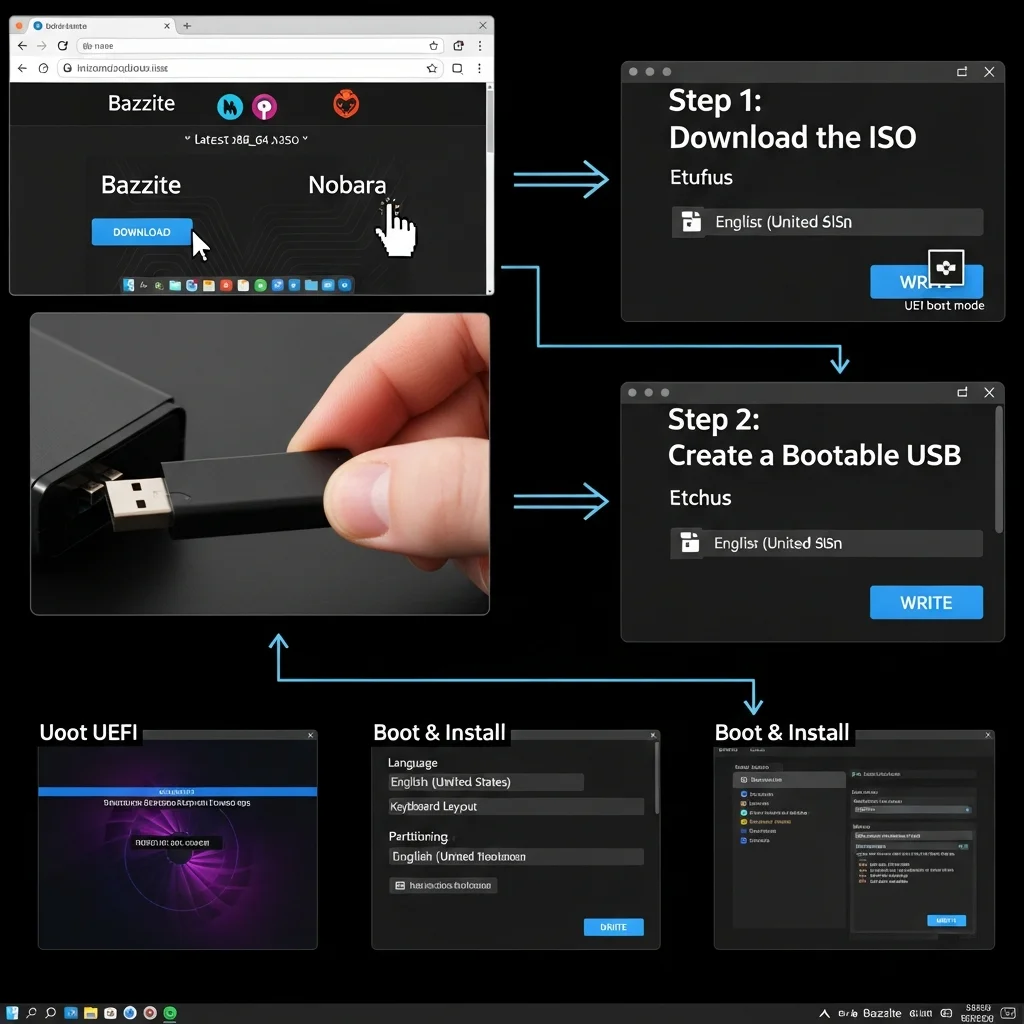
Step 1: Download the ISO
- Go to the official site:
- Bazzite Linux: https://bazzite.org/download
- Nobara Project: https://nobaraproject.org/download
- Choose the latest stable version (usually x86_64).
Step 2: Create a Bootable USB
- Use Rufus (Windows) or Etcher (Windows/Linux/macOS).
- Insert USB (8GB+), select ISO, write.
- Make sure UEFI boot mode is selected for modern PCs.
Step 3: Boot & Install
- Restart PC, press F12 / F2 / ESC for the boot menu.
- Select USB drive.
- Follow installer prompts:
- Choose language & keyboard.
- Select installation type: Erase disk / Custom partitioning.
- Set username, password, and hostname.
- Wait for installation to complete, then restart.
Step 4: Update System
- Open terminal:
sudo dnf update -y # For Nobara
sudo pacman -Syu # For Bazzite (Arch-based)
Step 5: Install Steam
- Nobara:
sudo dnf install steam -y
- Bazzite:
sudo pacman -S steam
- Launch Steam, log in.
Step 6: Install ProtonUp-Qt (Latest Proton / Wine)
- Download from https://github.com/DavidoTek/ProtonUp-Qt
- Run AppImage:
chmod +x ProtonUp-Qt-*.AppImage
./ProtonUp-Qt-*.AppImage
- Install the latest Proton-GE for Steam.
Step 7: Install MangoHud (FPS Overlay / Stats)
- Nobara:
sudo dnf install mangohud -y
- Bazzite:
sudo pacman -S mangohud
- Launch games with MangoHud:
mangohud steam
Step 8: Install Lutris (Game Manager)
- Nobara:
sudo dnf install lutris -y
- Bazzite:
sudo pacman -S lutris
- Launch Lutris, configure Wine runners, add games.
Step 9: Install Heroic (Epic Games Launcher)
- Download from https://heroicgameslauncher.com
- Extract, run AppImage:
chmod +x Heroic-*.AppImage
./Heroic-*.AppImage
- Login to Epic account, add games.
Step 10: Optional GPU Optimization
- NVIDIA:
sudo dnf install akmod-nvidia -y # Nobara
sudo pacman -S nvidia nvidia-utils # Bazzite
- AMD: Already included in Mesa drivers.
- Test: glxinfo | grep “OpenGL”
Proton / Wine Performance Tweaks
To maximize FPS and optimize Proton/Wine performance, first install Gamescope (sudo dnf install gamescope -y for Nobara, sudo pacman -S gamescope for Bazzite) and launch your game with VRR or HDR using gamescope -w 1920 -h 1080 –hdr steam. Install Proton-GE via ProtonUp-Qt and force it for your Steam games in the Compatibility settings to unlock better performance. For hybrid NVIDIA laptops, run games with prime-run steam or prime-run ./game_executable after installing drivers (akmod-nvidia or nvidia-utils). For AMD GPUs, reduce voltage with amdctl (sudo amdctl –core-voltage -50mV –mem-voltage -25mV) to lower temps while monitoring FPS through MangoHud. Optimize Wine/Proton by enabling Esync and Fsync (export WINEESYNC=1; export WINEFSYNC=1) and add these variables to Steam launch options. Finally, install Feral Gamemode (sudo dnf install gamemode -y / sudo pacman -S gamemode) and launch your games with gamemoderun steam, combining it with MangoHud (MANGOHUD=1 gamemoderun steam) for real-time performance monitoring and maximum FPS.
Communities & Support for Linux Gamers
Linux gamers can join vibrant communities to get support, share tips, and troubleshoot issues. Participate in r/linux_gaming on Reddit to discuss games, performance tweaks, and new releases. Explore GamingOnLinux forums for in-depth guides, reviews, and Linux-specific gaming news. Join the official Bazzite and Nobara Discord servers to connect directly with developers and fellow gamers, ask questions, and receive real-time help for installation, Proton/Wine tweaks, and optimization. Engaging with these communities ensures you stay up to date and solve problems quickly while maximizing your Linux gaming experience.
FAQs
Q1: Which Linux distro is best for NVIDIA GPUs?
For NVIDIA GPUs, Nobara and Bazzite provide the best driver support, easy installation, and optimized performance for Steam and Proton games.
Q2: What is the best Linux distro for handheld devices or Steam Deck alternatives?
Lightweight and gaming-optimized distros like Bazzite run smoothly on handheld devices and offer a Steam Deck-like experience.
Q3: Which Linux distros should beginners avoid for gaming?
Beginners should avoid minimal or overly complex distributions that require extensive manual setup, as they can make installing drivers and games difficult.
Q4: What is the best Linux distro for beginners switching from Windows?
Nobara or Ubuntu-based variants are ideal for Windows users, offering familiar interfaces, pre-installed drivers, and smooth Steam integration.
Q5: Can I play Windows games on Linux?
Yes, using Proton, Proton-GE, or Wine with Steam or Lutris/Heroic, most Windows games run seamlessly on gaming-focused Linux distros.
Q6: How do I maximize FPS on Linux?
Use Gamescope for VRR/HDR, enable Esync/Fsync in Proton/Wine, run NVIDIA games with PRIME, and AMD GPUs with undervolting, while monitoring performance with MangoHud.
Q7: Are all Steam games compatible with Linux
Most Steam games run with Proton, but some titles may need custom Proton-GE versions or Lutris/Heroic to work properly.
Q8: Where can I get help if a game won’t run?
Join communities like r/linux_gaming, GamingOnLinux forums, or Bazzite/Nobara Discord to troubleshoot, share tips, and get real-time assistance.
Q9: Can I run Epic Games Launcher on Linux?
Yes, use the Heroic Games Launcher to run Epic Games titles via Wine/Proton on Linux distros.
Q10: Which distro is best for beginners who want the easiest setup?
Nobara is beginner-friendly, pre-configured for gaming, with drivers, Steam, and Proton ready to go out of the box.
Conclusion
In 2026, Linux gaming has never been stronger. Whether you want max FPS on AMD with CachyOS, stable NVIDIA streaming on Nobara, or a handheld-friendly experience with Bazzite, there’s a Linux distro tailored to your setup. Start with Bazzite or Fedora KDE, follow the step-by-step install and optimization tips, and take advantage of Proton, Lutris, and Heroic for all your games. Share your setup, favorite tweaks, and must-play titles in the comments. Join the growing Linux gaming community, and game on without limits.